AI & Productivity11 min read
Why Every Engineer Should Build Their Own AI Assistant in 2026 (And How to Start Today)
By AI Jungle Team· Updated Feb 26, 2026
Building a personal AI assistant isn't just about productivity—it's about staying relevant. Learn how to create your own using modern tools like LangGraph, Microsoft Agent Framework, and Cursor IDE.

Key Takeaways
- Building your own AI assistant is now essential for competitive engineers in 2026 — those who don't are already falling behind in productivity and capabilities
- Modern tooling has matured: LangGraph 0.3+, Microsoft Agent Framework (formerly AutoGen), Cursor IDE, and Ollama make development accessible to any engineer
- Start simple with automation (git hooks, code reviews) before building complex multi-agent systems — the learning curve is manageable when approached incrementally
- Local development via Ollama with Llama 4 provides cost-effective testing and complete privacy during development, with easy cloud deployment when ready
- ROI is measurable: 10-20 hours investment breaks even in 4-8 weeks through time savings, improved code quality, and enhanced learning acceleration
12 min read | AI & Engineering

If you're an engineer who hasn't built your own AI assistant yet, you're already behind. Not because you need to keep up with trends, but because the engineers who are building and using personalized AI tools are simply more productive, more creative, and more valuable to their teams.
This isn't about replacing yourself with AI—it's about augmenting your capabilities in ways that generic tools like ChatGPT simply can't match. Your personal AI assistant knows your codebase, understands your preferences, and automates the mundane tasks that eat up your mental energy.
The Competitive Advantage You Can't Ignore
Here's what happened to three engineers we know:
Sarah, a backend engineer at a fintech startup, built an AI assistant that automatically reviews her pull requests for security vulnerabilities specific to financial applications. Her code quality improved dramatically, and she caught several critical issues that would have made it to production.
Mike, a DevOps engineer, created an assistant that monitors system health and generates intelligent alerts with suggested fixes. Instead of reactive firefighting, he now handles incidents proactively. His team's downtime decreased by 70%.
Alex, a frontend developer, built an assistant that converts design mockups into functional React components. What used to take hours now takes minutes, freeing him to focus on complex state management and user experience optimization.
These aren't exceptional cases. They're becoming the norm for engineers who understand that AI assistants aren't about replacing human judgment—they're about amplifying human intelligence.
Why Generic AI Tools Aren't Enough
ChatGPT and Claude Sonnet 4.6 are incredible, but they have fundamental limitations:
No context about your specific work: They don't know your codebase, your team's conventions, or your personal preferences.
No memory between sessions: Every conversation starts from scratch, requiring you to re-explain context repeatedly.
No integration with your tools: They can't directly access your IDE, git repositories, or deployment pipelines.
Generic responses: They give general advice that you have to adapt to your specific situation.
A personal AI assistant solves all these problems. It becomes an extension of your technical expertise, tailored specifically to how you work.
The Modern AI Assistant Stack: What's Changed in 2026
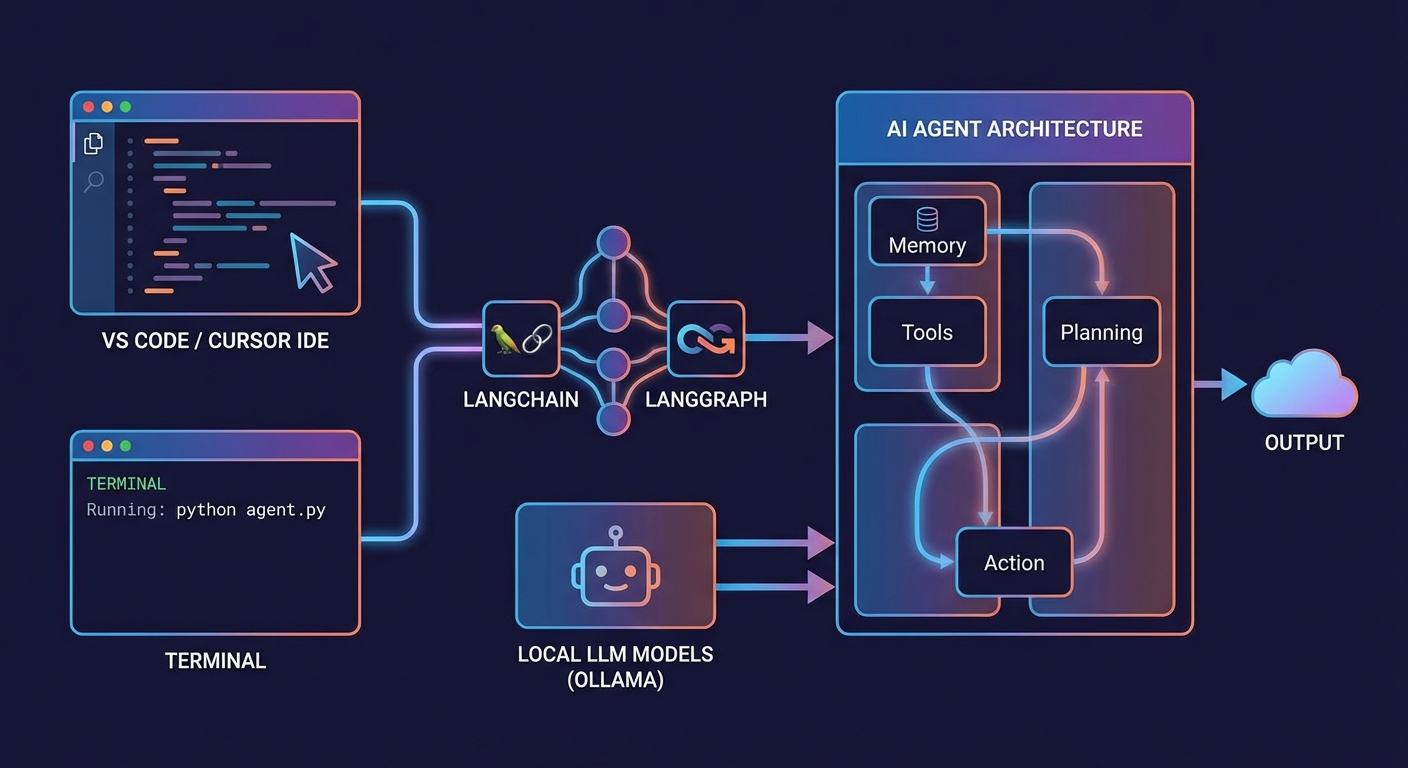
The tooling landscape has evolved dramatically. Here's what today's engineers are using:
Foundation: LangChain and LangGraph 0.3+
LangChain remains the go-to framework for building AI applications, but LangGraph 0.3+ is where the real power lies. It enables you to create sophisticated agent workflows with conditional logic, human-in-the-loop approvals, and state management.
Why it matters: Instead of simple request-response interactions, you can build assistants that handle complex, multi-step workflows autonomously.
Example use case: An assistant that analyzes a bug report, reproduces the issue locally, identifies the root cause, suggests fixes, and creates a pull request—all while keeping you informed at each step.
Framework Evolution: Microsoft Agent Framework
What changed: Microsoft retired AutoGen in late 2025 and replaced it with the Microsoft Agent Framework, which unifies AutoGen and Semantic Kernel into a production-ready platform.
Why it matters: Better enterprise integration, improved reliability, and native support for team-based agent workflows.
Perfect for: Engineers working in Microsoft-heavy environments or building assistants that need to integrate with Office 365, Azure, or Teams.
Alternative Frameworks: CrewAI
CrewAI continues to thrive as a lightweight alternative for building multi-agent systems. It's particularly strong for engineers who want to quickly prototype agent workflows without the complexity of enterprise frameworks.
Best for: Personal productivity assistants, small team collaboration tools, and rapid experimentation.
Development Environment: Cursor vs Continue.dev
Cursor has solidified its position as the leading AI-native IDE. Built on VSCode, it provides intelligent code completion, AI-powered debugging, and seamless integration with various AI models.
Continue.dev has evolved beyond just a VS Code extension—it now offers AI-powered CI/CD checks that run as GitHub status checks on every pull request, ensuring code quality and standards compliance.
Our recommendation: Use Cursor for day-to-day development and Continue.dev for automated code quality checks in your CI/CD pipeline.
Local Development: Ollama and Llama 4
Ollama remains the best tool for running AI models locally, now with OpenAI API compatibility making it even easier to integrate into existing workflows.
Latest models available:
- Llama 4 - Meta's latest natively multimodal model, excellent for code analysis and generation
- Claude Sonnet 4.6 - Available through cloud APIs, best-in-class reasoning
- Phi-4-mini - Microsoft's compact model with enhanced function calling support
Why local matters: Faster iteration, complete privacy, and no API costs during development.
Code Intelligence: Aider
Aider continues to be one of the most impressive AI coding assistants. It can make coordinated edits across multiple files, understand complex codebases, and maintain consistency across large refactoring operations.
Unique strength: Unlike other tools that work file-by-file, Aider understands your entire project structure and can make intelligent changes across your whole codebase.
Building Your First AI Assistant: A Practical Guide
Phase 1: Start Simple (Week 1-2)
Don't try to build a complex multi-agent system immediately. Start with basic automation:
Project idea: A code review assistant that analyzes your Git commits and suggests improvements.
Tools you'll need:
- Python (for scripting)
- LangChain for AI interactions
- Ollama for local model hosting
- Git hooks for automation
Basic workflow:
# Simplified example
def review_commit(commit_hash):
    diff = get_git_diff(commit_hash)
    prompt = f"Review this code change and suggest improvements:\n{diff}"
    response = llm.invoke(prompt)
    return format_review(response)
What you'll learn: Basic AI integration, prompt engineering, and automation workflows.
Phase 2: Add Memory and Context (Week 3-4)
Enhance your assistant with persistent memory and project context:
Upgrades:
- Store conversation history in a local database
- Index your codebase for context retrieval
- Add project-specific knowledge and conventions
Tools to add:
- Vector database (ChromaDB or similar) for code indexing
- Persistent storage for conversation history
- Configuration files for project-specific settings
Example enhancement:
def enhanced_review(commit_hash):
    diff = get_git_diff(commit_hash)
    context = get_relevant_code_context(diff)
    history = get_conversation_history()

    prompt = f"""
    Based on our previous discussions about {project_name}:
    {history}

    And this related code context:
    {context}

    Review this change:
    {diff}
    """

    response = llm.invoke(prompt)
    save_conversation(prompt, response)
    return format_review(response)
Phase 3: Multi-Agent Workflows (Month 2)
Once you're comfortable with basic assistants, explore multi-agent systems using LangGraph:
Project idea: A development workflow assistant with specialized agents:
- Code Agent: Handles code analysis and generation
- Testing Agent: Creates and runs tests
- Documentation Agent: Updates documentation
- Deployment Agent: Manages CI/CD workflows
Architecture:
from langgraph.graph import StateGraph, END

workflow = StateGraph(DevelopmentState)
workflow.add_node("analyze_code", code_agent)
workflow.add_node("run_tests", testing_agent)
workflow.add_node("update_docs", docs_agent)
workflow.add_node("deploy", deployment_agent)

# Define conditional transitions
workflow.add_conditional_edges(
    "analyze_code",
    should_run_tests,
    {"run_tests": "run_tests", "skip": "update_docs"}
)
Phase 4: Advanced Integration (Month 3+)
Integrate your assistant deeply into your development environment:
Advanced features:
- Real-time code analysis in your IDE
- Intelligent error debugging and fix suggestions
- Automated code documentation generation
- Smart refactoring recommendations
- Integration with project management tools
Real-World Assistant Architectures
The Productivity Multiplier
What it does: Monitors your work patterns and suggests optimizations Components:
- Time tracking integration (RescueTime, Toggl)
- Calendar analysis for focus time identification
- Task prioritization based on deadlines and effort estimates
- Automated status updates for team communication
Impact: Users report 20-30% improvement in focused work time.
The Code Quality Guardian
What it does: Maintains code quality standards across your projects Components:
- Pre-commit hooks with AI-powered analysis
- Automated security vulnerability scanning
- Code style and convention enforcement
- Technical debt identification and prioritization
Impact: Significant reduction in bugs and code review cycles.
The Learning Accelerator
What it does: Helps you stay current with technology and best practices Components:
- News and article summarization from tech sources
- Code pattern analysis to identify learning opportunities
- Skill gap identification based on job market trends
- Personalized learning path recommendations
Impact: Keeps you ahead of technology trends and career progression.
Common Pitfalls and How to Avoid Them
Pitfall 1: Over-Engineering from the Start
The mistake: Trying to build a comprehensive system before understanding your actual needs.
The solution: Start with one specific, annoying task you do repeatedly. Build a simple solution. Expand gradually.
Pitfall 2: Ignoring Privacy and Security
The mistake: Sending sensitive code or company data to external AI services without considering security implications.
The solution: Start with local models via Ollama. If using cloud APIs, implement proper data sanitization and get necessary approvals.
Pitfall 3: Not Making It Actually Useful
The mistake: Building cool demonstrations that don't solve real problems in your workflow.
The solution: Track specific metrics. How much time does your assistant save? What tasks does it eliminate? If you can't measure the impact, it's probably not solving a real problem.
The ROI of Building Your Own Assistant
Time investment: 10-20 hours for a basic assistant, 50-100 hours for an advanced system Time savings: 2-5 hours per week once fully implemented Break-even point: 4-8 weeks for basic systems, 3-6 months for advanced systems
But the real value isn't just time savings. Engineers with personalized AI assistants report:
- Higher job satisfaction (less mundane work)
- Improved code quality (consistent analysis and suggestions)
- Faster learning (AI helps explore new technologies)
- Career acceleration (demonstrates advanced technical skills)
Getting Started This Week
Day 1: Choose your development environment (Cursor + Ollama recommended) Day 2: Set up LangChain and download a local model (Llama 4 or Phi-4-mini) Day 3: Identify one repetitive task you want to automate Day 4-5: Build a basic script that automates this task with AI assistance Day 6-7: Test, refine, and start using it daily
Your first assistant doesn't need to be perfect. It needs to be useful.
Tools and Resources
Essential frameworks:
- LangChain/LangGraph for AI application building
- Microsoft Agent Framework for enterprise integration
- CrewAI for rapid multi-agent prototyping
Development tools:
- Cursor for AI-native development
- Continue.dev for AI-powered CI/CD
- Aider for intelligent code editing
Models and hosting:
- Ollama for local development
- Llama 4 for general-purpose assistance
- Claude Sonnet 4.6 via API for complex reasoning
Learning resources:
- LangChain documentation and examples
- AI engineering communities and forums
- Open-source assistant projects for inspiration
The Future Is Personal AI
Generic AI tools will become commodities. The competitive advantage will belong to engineers who build personalized AI systems that understand their unique workflows, preferences, and challenges.
Your AI assistant isn't just a productivity tool—it's a reflection of your expertise, a multiplier of your capabilities, and a hedge against technological displacement.
The engineers who build these systems today will be the technical leaders of tomorrow.
Start building yours this week. Your future self will thank you.
Related Reading
- What Is an AI Agent? The Business Leader's Guide — Understand the AI agent architecture behind personal assistants.
- ChatGPT vs Personal AI Agent: An Honest Comparison — See why building your own beats using generic tools.
- Why Busy Professionals Are Switching to Personal AI Agents — The business case for personal AI agents.
- How to Set Up a WhatsApp AI Agent in 2026 — A practical guide to deploying your AI assistant on WhatsApp.
- 10 AI Prompts That Save 2 Hours Every Day — Start with copy-paste templates before building a full assistant.
- The AI Agency Model — How AI assistants power a new kind of consulting firm.
- See Maida, our AI executive assistant built with these exact principles.
- Browse our AI products and services.
Want Your Own AI Agent — Without Building It Yourself?
Not every engineer wants to build from scratch. Maida is our ready-made AI executive assistant that handles email, scheduling, research, and more — so you can focus on what matters.
Not sure if an AI agent is right for you?
The AI Agent Decision Guide walks you through a 20-question framework to figure out what setup actually fits your workflow. Free PDF.
Keep Reading
AI & Productivity
What Is an AI Agent? The Business Leader's Guide for 2026
AI agents are autonomous software that take actions on your behalf — scheduling, research, email, decisions. Here's what they are, how they work, and whether your business needs one.
AI & Productivity
How to Build an AI Agent That Gets Smarter Without Retraining
How to build an AI agent that improves itself from user corrections — no model retraining needed. Real production system: two Python scripts, emergent learning behavior.

Business
The AI Agency Model: How a 2-Person Team Outperforms a 20-Person Consultancy
Real numbers, real deliverables. How we run an AI consulting agency with 2 humans and AI agents, and why the traditional consulting model is about to break.